
The Short Version…
The recommendation_v9.sqlite database in iOS is a new (to me at least) source of detailed application foreground and background activity, with records spanning several months. This data can be highly valuable in analyzing device interactions around specific events, such as a vehicle crash. Below is a link to a script/parser that processes this database and generates a timeline-formatted CSV.
The Longer Version…
In a recent traffic crash case involving an iPhone, I was reviewing various timestamps and came across recommendation_v9.sqlite, a database I hadn’t seen before. This led me into the familiar process of discovery (the part of the job that’s always fun) figuring out how it works and what insights it might provide.
Once I started digging into the database, I noticed that the timestamp of interest was in a column labeled “ZTTIME” within the “ZAMDAPPEVENT” table. Things got even more interesting when I saw some of the other column names; “ZADAMID”, “ZTIME”, “ZFOREGROUNDDURATION” 🤔, “ZEVENTSUBTYPE”, “ZTYPE”, and “ZAPPVERSION”.
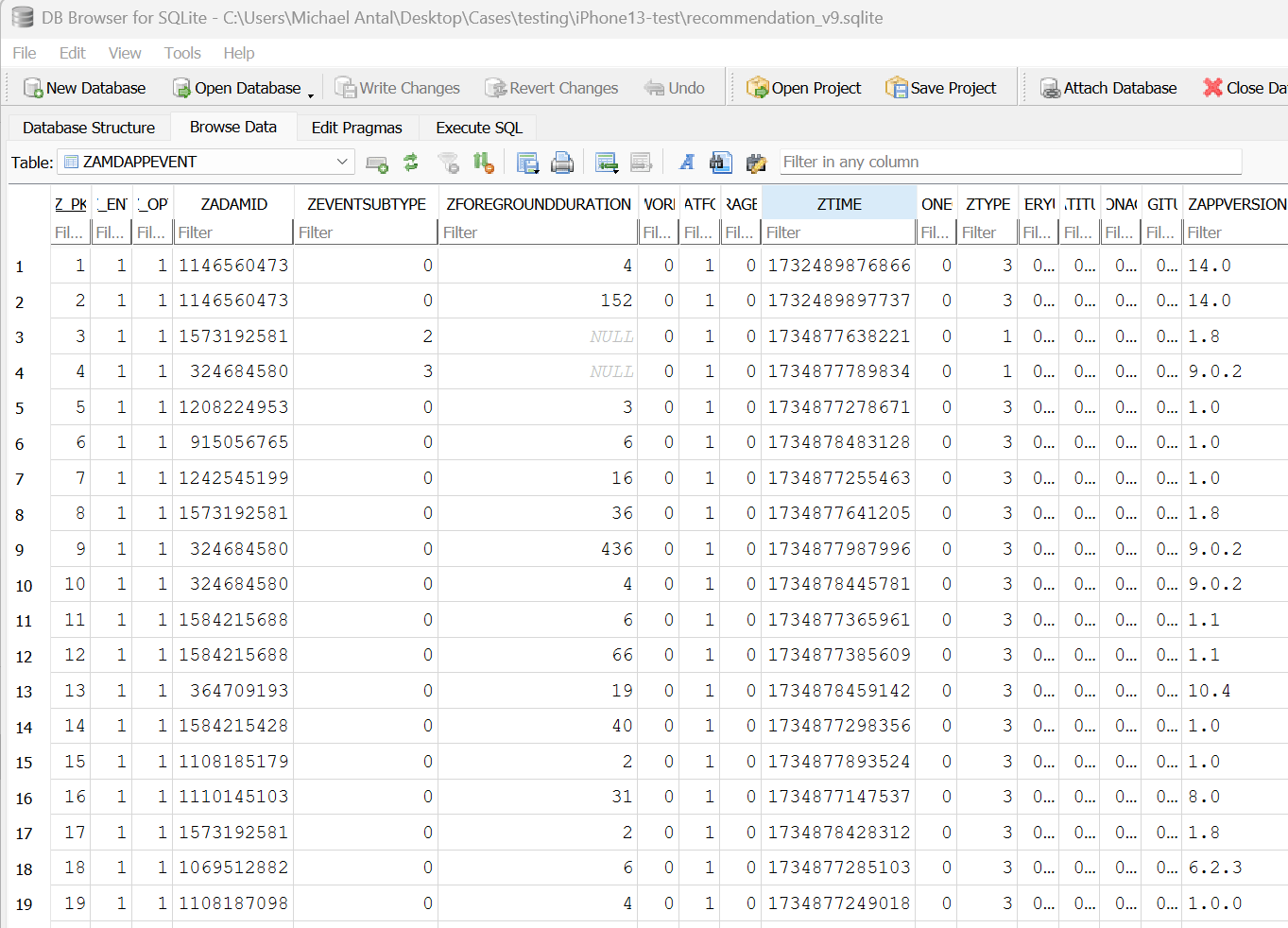
While all these columns add important context, ZFOREGROUNDDURATION immediately stood out…because what analyst working a traffic crash case wouldn’t want to know how long an app was in the foreground at a specific moment? After running a few SQL queries, it became clear that this wasn’t just another rabbit hole, it was something worth fully exploring.
I hadn’t come across the ZADAMID column label before, but the numbers looked a lot like iOS app IDs. So, I took a shot, and sure enough, ZADAMID turned out to be the iOS app ID. If you plug any of the numbers from the ZADAMID column into the App Store URL apps.apple.com/us/app/?? (replacing the ?? with the number), you’ll get the app’s name and some basic details, enough to quickly figure out what you’re looking at.
ZEVENTSUBTYPE and ZTYPE entries are integers that likely represent something useful, but for now, that’s all I know without more testing. Figuring out what these values correspond to could potentially provide insight into different ways an app enters (and/or leaves) the foreground; whether it was newly opened, launched from a link, triggered by a notification, accessed via recent tiles, etc.
In testing, I only saw values ranging from 0 to 3, and I haven’t yet fully tested with a focus on different types of app foreground initiations. However, in previous cases, I came across values from 0 to 4, so parsing these columns could prove valuable with further research.
The ZFOREGROUNDDURATION column seemed to be an integer representing the amount of time (in seconds?) that an app remained in the foreground, but I needed to do some testing to confirm. More on that below.
The ZTIME column is a Unix Epoch timestamp, counting the seconds since January 1, 1970. Pretty straightforward, but I wasn’t sure what these timestamps actually represented…were they the precise moment the apps entered the foreground, or something else? More research was needed to figure that out.
ZAPPVERSION is self-explanatory but still required testing to verify.
Research
Since Josh Hickman generously dedicated significant time and effort to populating mobile devices with data and meticulously documenting it for testing purposes, I downloaded his iOS 17 public image, which includes a forensic extraction of this data, along with the accompanying documentation. I extracted the iOS Recommendation_v9.sqlite DB and queried it, revealing that it does appear to track foreground and background activity, including start time, duration in seconds, application name, and version. But, there were few anomalies (missing entries) so I decided that actual testing was warranted.
Script Development
While researching, I quickly realized I needed to parse the data into a more usable format… enter my new friend, AI (it looks like “AL,” but it’s “Ai” 😁). Using what I discovered, I developed a Python script that queries the ZAMDAPPEVENT table, retrieves and converts timestamps, extracts app usage details and metadata, and maps iOS app IDs to app names using a text file specifically created for this purpose.
Since there are over a million apps in the App Store, I plan to create a repository to crowdsource this file for now. Initially, I attempted to use the storeuser.db database from the same device as recommendation_v9.sqlite, but AI and I quickly realized that was a bit too challenging; so, for now, I’ve opted for the text file approach. That said, storeuser.db may be the better long-term solution, and I’d welcome any help in exploring that path. It would make app ID mapping much more efficient, as it contains the App IDs (although not labeled as ADAMID), package names, and common names, while also being limited to apps that are or were on the device, eliminating the need to query millions of entries in the text file, but I digress…
The script uses ZTIME entries to determine when an app entered the foreground and ZFOREGROUNDDURATION to record when it was moved to the background. It then structures the extracted data into a timeline-formatted CSV, making it much easier to analyze app foreground and background activity.
A quick note…
In all of my cases involving recommendation_v9, the .wal (write-ahead log) files associated with the databases are significantly larger than the databases themselves. This is something to keep in mind when analyzing these files.
During testing, I exported the databases along with their associated .wal files to a directory and opened them in DB Browser for SQLite, both with and without checkpointing the changes and noticed differences between the two approaches, reinforcing the importance of understanding how SQLite and .wal files interact.
Thanks to Ian Whiffin and his tool ArtEx, you can do exactly that. Using this .wal-aware tool, I was able to confirm the presence of many more database entries that wouldn’t have been visible otherwise. The script processes the database along with its associated .wal file, ensuring a more complete extraction of data, but be sure to compare any output with Ian’s tool both with and without the .wal file.
This isn’t meant to be a deep dive into proper SQLite and .wal file handling, but it’s worth noting that missing data is a real possibility; both when checkpointing and when leaving the .wal file untouched. For those interested in learning more, I highly recommend Paul Sanderson’s book, SQLite Forensics.

Testing
To test, I pulled out my dusty but trusty iPhone 13 (iOS 17.6.1) (it doesn’t get much use since I’m an Android guy) and took screen recordings while interacting with various apps. I then created a forensic extraction of my test device and compared the script-parsed recommendation_v9 data with the documented screen activity. The results were remarkable.
Every recorded third-party app (and most native apps) foreground/background transition was accurately logged in the database. In the screen capture below, the spreadsheet on the left displays the script’s output (timestamps in UTC), while the one on the right shows recorded screen interactions (timestamps in EST, UTC-5). Testing continued over several days, not just the single day shown in the screenshot.
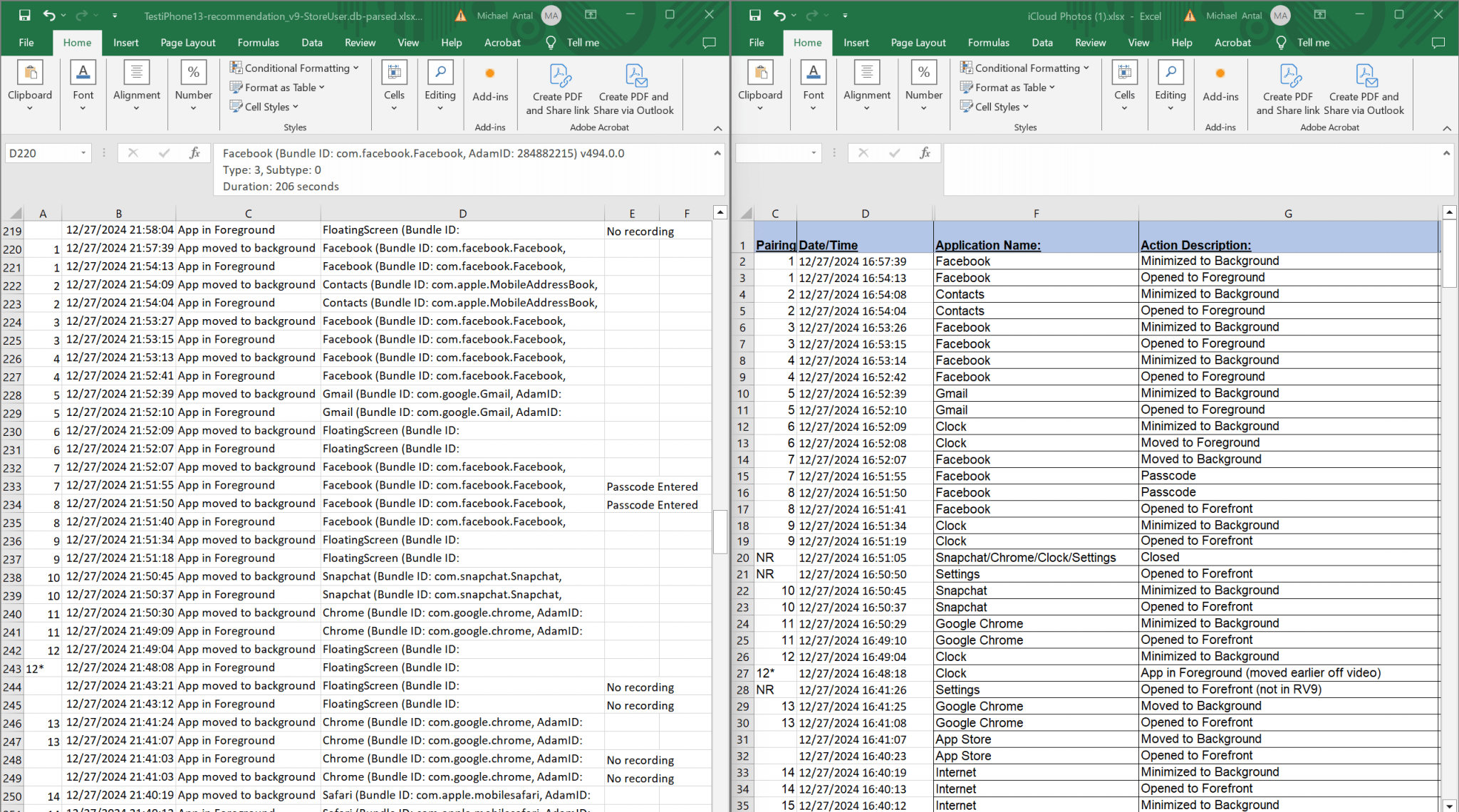
As you can see, the script extracts and includes the app’s common name, Bundle ID, AdamID (aka App ID), app version, type, subtype, and duration.
As mentioned earlier, type and subtype are still unknown but potentially important. However, timestamps, durations, Bundle IDs, and app versions have all been verified through research and testing.
Regarding the anomaly I observed in Josh Hickman’s public image, my testing did not span weeks or months, which may impact the presence of records in the database. Because of this, I wouldn’t use the absence of records to conclude that no app foreground/background transitions occurred during a specific time period. As always, proving a negative is a difficult task. While my own limited testing supports the accuracy of recommendation_v9.sqlite in logging all app transitions, my research using Josh Hickman’s public images (spanning several weeks) suggests that gaps in recorded data may occur. This makes the database unreliable for drawing conclusions based solely on the absence of records.
Since coming across recommendation_v9.sqlite, I’ve revisited several of my active iOS cases and found it present in all my iPhone cases with iOS versions as far back as 15. In every instance, it has provided additional context about device interactions at or near the time of a crash. It’s possible that the database exists in earlier iOS versions, but I don’t have older case data to confirm, so it’s definitely worth checking for yourself. The bad news? In a recent case running iOS 18.1, the file was missing. 😒 However, I have not have not yet had the opportunity to examine a device with an OS later than iOS 18.1, so YMMV.
Next up, I’m working on adapting the script to run within Alexis Brignoni’s fantastic iLEAPP tool so the output can be integrated into a broader timeline of device activity.
Conclusion
The recommendation_v9.sqlite database has been found on iPhones running iOS 15 through at least iOS 17 and may be present in earlier versions. It provides a look at app foreground and background activity that could offer useful insights for forensic analysis. That said, its absence in iOS 18.1 suggests it may not be around for long.
The script helps pull and organize this data into a timeline, making analysis easier. Next steps include integrating it into iLEAPP to expand its usefulness.
If you stumble across anything new, especially about ZTYPE, ZEVENTSUBTYPE, (or if you find the recommendation_v9.sqlite file in a more recent iOS version extraction)—I’d love to hear about it!